MB-3 Multiband Drive manual
Three distortion stages, each on its own band, with nine curves and an effect in each. MB-3 Multiband Drive splits your sound at edges you set anywhere from 20 Hz to 20 kHz and drives each of three bands through a stage of its own, while whatever lies outside a stage’s band passes it unchanged. Each stage has nine curves, from tanh saturation and a hard clip to folding, rectifying and a step quantizer, up to 48 dB of drive, a feedback loop that repeats it after 0.2 to 500 ms or a note value of your song, and an effect of its own. The curves run at four times the sample rate at 44.1 and 48 kHz and are read through their antiderivatives, and the plugin tells your music app its fixed delay of about 3 milliseconds, so the app makes up for it.
On this page
Open it in your DAW
MB-3 Multiband Drive plays inside Studio 56 FX, which installs with Studio 56. Add Studio 56 FX to a track as an effect and sign in, then choose MB-3 Multiband Drive on Home.
If you don’t have Studio 56 yet, the Support page shows how to install it and add it to a track in your DAW.
The four knobs
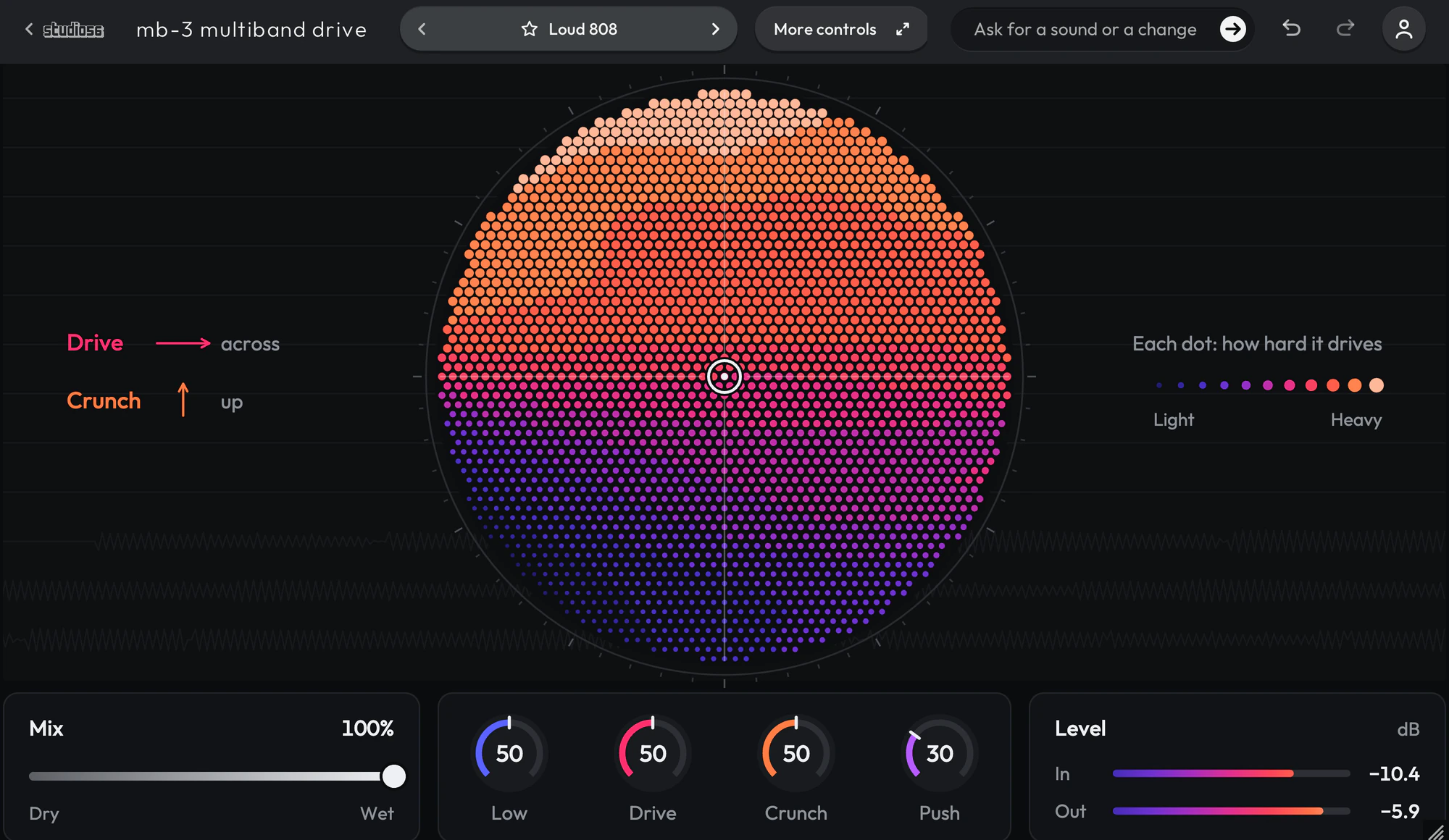
The four knobs on MB-3 Multiband Drive’s screen shape the whole sound, and each preset sets where they start.
- Low
- Turns the level of the stage on the low band and that stage’s low shelf at 500 Hz, and moves where the band ends.
- Drive
- Drives the stage on the middle band harder, and moves its curve’s Shape and its level with it.
- Crunch
- Drives the stage on the top band harder and, on most presets, brings that band’s lower edge down into the sound. On about half the presets it turns that stage’s level down as it drives, and on a few the level coming out, so a full turn up adds at most about 5 dB. It also moves the curve’s Shape, the high shelf at 5 kHz, its effect’s mix and its width.
- Push
- Raises the level into all three stages, so each is driven harder, and turns the low band’s level back down against it; it also moves the middle band’s effect, its loop on a preset that uses one, and the level coming out.
Your DAW records every turn as automation, and Undo takes a turn back.
Using presets
Click the preset’s name at the top to see them all, or use the arrows beside it to go to the next or the one before. Its folders are down the side, with Favorites and My presets under them, and the star beside a preset keeps it in Favorites.
Save as new keeps the sound you have under a name of your own in My presets, and Save updates one of yours. Point at one of yours to rename or delete it.
Write 4 more like this writes four new presets close to the one you’re on and places them around it on the map beside the list. Drag the dot between them to blend, and Keep this sound saves the blend as a preset of your own. It works with Pro and on a plugin you bought.
95 presets
MB-3 Multiband Drive comes with 95 presets in 13 folders, each named for how it sounds.
- Loud 808808s0:11
- Folded 808 Buzz808s0:12
- Clean Sub Clipper808s0:11
- 808 Octave Fuzz808s0:11
- 808 Echo Grit808s0:12
- Crushed 808808s0:11
- Ringing 808808s0:11
- Mid Crunch 808808s0:11
- Tube 808808s0:11
- Overdriven Glide 808808s0:11
+ 85 more presets
More controls
More controls at the top opens the settings MB-3 Multiband Drive’s face has no room for. Press it again to go back.
Nine curves in each stage: Saturate, Clip, Fold, Sine Fold, Rectify, Shred, Tube, Overdrive and Warm. An effect in each stage: a filter, a flanger, a phaser, a chorus, a delay, a reverb, a frequency shifter or a bit reducer. Aliasing under -60 dBc on six of the nine curves, driven up to 30 dB at -6 dBFS. One LFO, free at its own rate or in note lengths of your song, on the controls a preset routes it to. About 3 milliseconds of delay, which your music app makes up for.
- Multi-Stage Drive
- Stacks three distortions, each on its own band, such as saturated lows, clipped mids and crushed highs with the rest left clean.
System requirements
- Mac
- macOS 10.15 Catalina or later, on Apple silicon or Intel
- Windows
- Windows, 64-bit
- Plugin formats
- VST3 and AU on Mac, VST3 on Windows
- DAWs
- Ableton Live, Logic Pro, GarageBand, FL Studio and other DAWs that load VST3 or AU plugins, but not Pro Tools
- Internet
- To sign in, to get what you buy and to make instruments and effects, but not to play them
More help
Installing Studio 56, using it offline and other questions are answered on the Support page. For anything else, write to oliver@studio56.ai.