TX-5 Drive manual
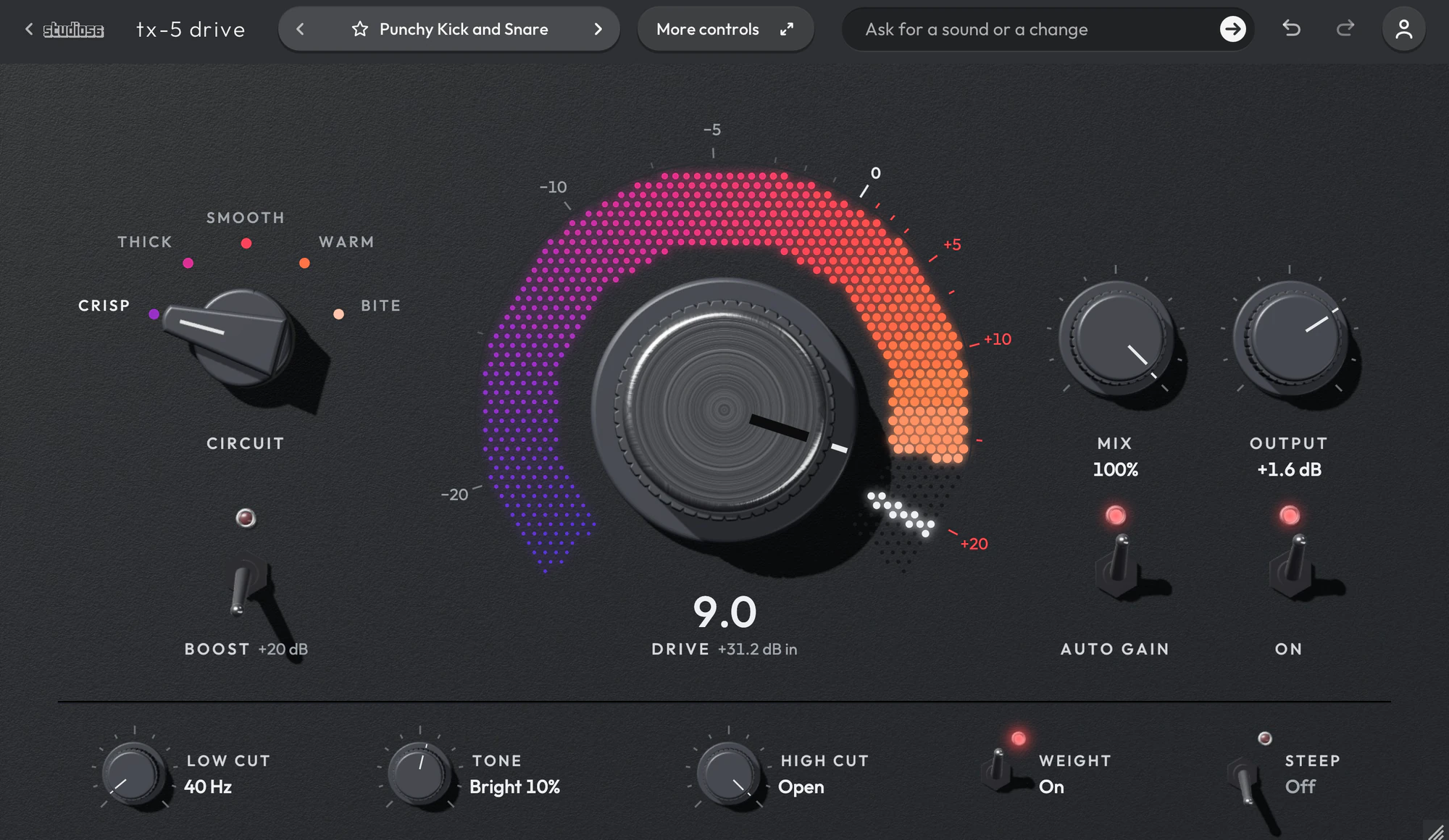
Five transistor and tube circuits behind one Drive, with filters before and after. TX-5 Drive runs your sound through one of five circuits, a silicon and a germanium transistor stage and three tube stages, each solved sample by sample with its capacitors, so a loud hit can bias a stage off and leave the quiet note after it a few dB lower for a moment. Drive sets the gain into the circuit from -12 dB at 0 to +36 dB at 10, Boost adds 20 dB more, and the meter reads 0 where the chosen circuit reaches 1 % harmonics. Low Cut and Tone come before the circuit and High Cut after it, and Auto Gain gives back what the circuit presses out from a fixed table, without reading your sound.
On this page
Open it in your DAW
TX-5 Drive plays inside Studio 56 FX, which installs with Studio 56. Add Studio 56 FX to a track as an effect and sign in, then choose TX-5 Drive on Home.
If you don’t have Studio 56 yet, the Support page shows how to install it and add it to a track in your DAW.
The four knobs
The four knobs on TX-5 Drive’s screen shape the whole sound, and each preset sets where they start.
- Drive
- Sets the gain into the circuit from -12 dB at 0 to +36 dB at 10, 4.8 dB a number, and the meter rises with it.
- Tone
- Tilts the sound about 1 kHz before the circuit, by up to 6 dB at each end, so it also chooses whether the lows or the highs distort first.
- High Cut
- Sets a low-pass after the circuit anywhere from 1 to 20 kHz, falling 6 dB an octave or 30 dB with Steep, and at 20 kHz takes it out of the path.
- Mix
- Blends your dry sound back in from 0 to 100 %, held in time with the circuit so the two add in phase.
Your DAW records every turn as automation, and Undo takes a turn back.
Using presets
Click the preset’s name at the top to see them all, or use the arrows beside it to go to the next or the one before. Its folders are down the side, with Favorites and My presets under them, and the star beside a preset keeps it in Favorites.
Save as new keeps the sound you have under a name of your own in My presets, and Save updates one of yours. Point at one of yours to rename or delete it.
Write 4 more like this writes four new presets close to the one you’re on and places them around it on the map beside the list. Drag the dot between them to blend, and Keep this sound saves the blend as a preset of your own. It works with Pro and on a plugin you bought.
96 presets
TX-5 Drive comes with 96 presets in 10 folders, each named for how it sounds.
- Dark Rounded BreakDrums0:10
- Dirty 808Bass0:12
- Tube VocalVocals0:10
- Distorted VocalVocals0:14
- Thick Power ChordsGuitar0:11
- Small Amp GuitarGuitar0:12
- Driven OrganChords0:11
- Crunchy ChordsChords0:11
- Screaming LeadMelodies0:12
- Console GlueFull Mix0:11
+ 86 more presets
Every control is on its face
TX-5 Drive has no second page to open.
Five circuits whose harmonics on a full-level bass at Drive 5 run from 3.9 % on Crisp to 13.2 % on Bite. A meter that reads 0 dB where the chosen circuit reaches 1 % harmonics at 1 kHz, and Boost for 20 dB more drive. Low Cut from 20 Hz to 1 kHz and Tone before the circuit, High Cut at 6 or 30 dB an octave after it. Auto Gain from a fixed table by circuit and Drive, keeping five test clips’ mean loudness within 1 dB of the input from Drive 0 to 10.
- Circuit Saturator
- Drives a sound through one of five analog circuits, tube or transistor, from faint warmth to heavy distortion.
System requirements
- Mac
- macOS 10.15 Catalina or later, on Apple silicon or Intel
- Windows
- Windows, 64-bit
- Plugin formats
- VST3 and AU on Mac, VST3 on Windows
- DAWs
- Ableton Live, Logic Pro, GarageBand, FL Studio and other DAWs that load VST3 or AU plugins, but not Pro Tools
- Internet
- To sign in, to get what you buy and to make instruments and effects, but not to play them
More help
Installing Studio 56, using it offline and other questions are answered on the Support page. For anything else, write to oliver@studio56.ai.