RM-8 Rhythm Modulator manual
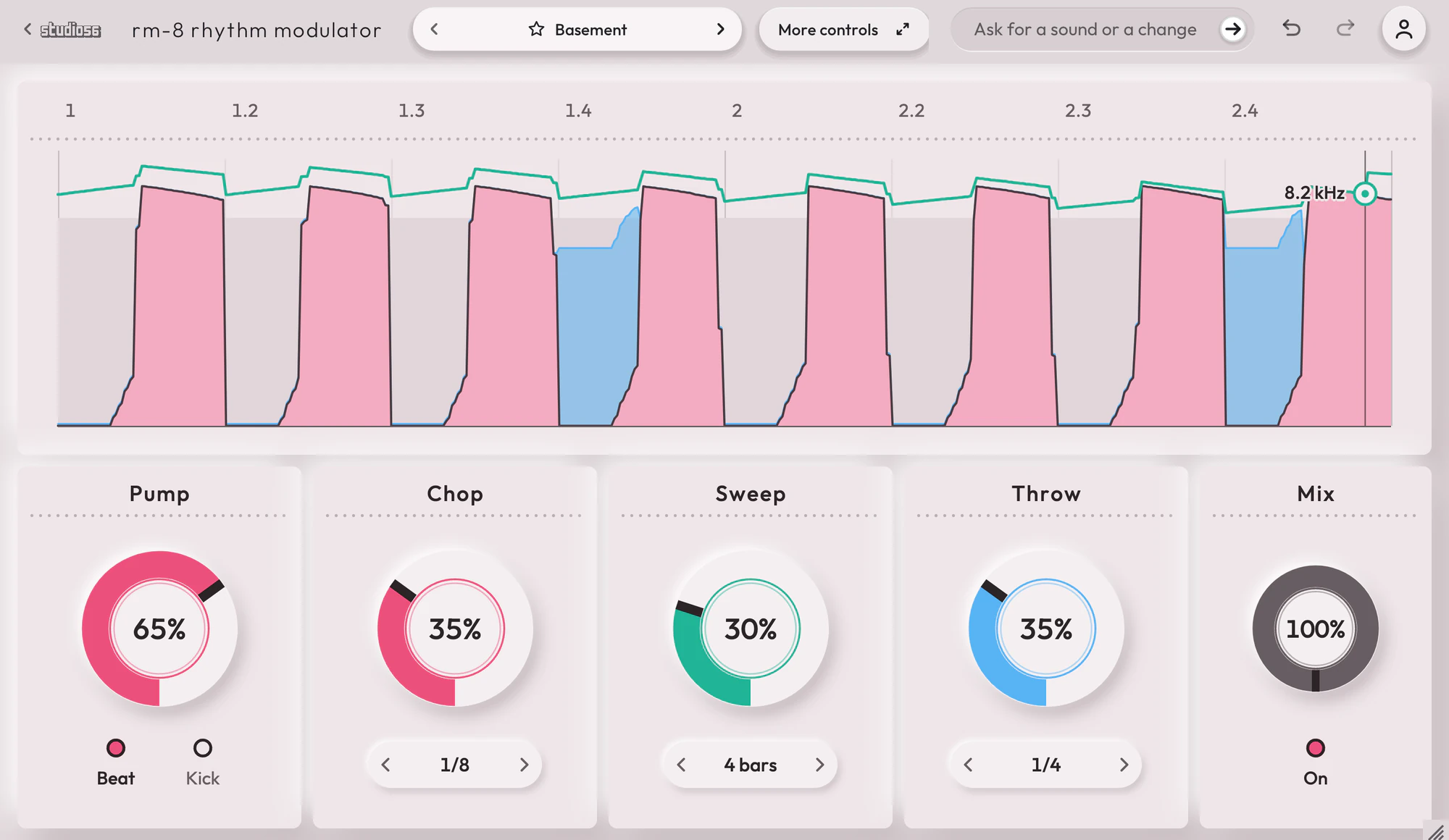
A rhythm effect that pumps, chops, sweeps and echoes any sound in time with your song. RM-8 Rhythm Modulator runs your sound through two chains of up to four effects, side by side. Four rhythms, two on each chain, move any of that chain’s 38 controls in time with your song: a pattern of up to 32 steps, an LFO from a 64th note to eight bars, or a sidechain that follows the sound itself or your kick drum. No move is sharper than a 3 ms edge, so a chop never clicks.
On this page
Open it in your DAW
RM-8 Rhythm Modulator plays inside Studio 56 FX, which installs with Studio 56. Add Studio 56 FX to a track as an effect and sign in, then choose RM-8 Rhythm Modulator on Home.
If you don’t have Studio 56 yet, the Support page shows how to install it and add it to a track in your DAW.
The four knobs
The four knobs on RM-8 Rhythm Modulator’s screen shape the whole sound, and each preset sets where they start.
- Pump
- Ducks the sound under every beat and lets it swell back, deeper the higher it goes.
- Chop
- Cuts the sound into short stabs on the preset’s pattern, until only the stabs are left.
- Sweep
- Brings in a slow filter sweep that darkens the sound and opens it again in time with your song.
- Throw
- Throws parts of the bar into echoes that get louder and ring longer as you turn it up.
Your DAW records every turn as automation, and Undo takes a turn back.
Using presets
Click the preset’s name at the top to see them all, or use the arrows beside it to go to the next or the one before. Its folders are down the side, with Favorites and My presets under them, and the star beside a preset keeps it in Favorites.
Save as new keeps the sound you have under a name of your own in My presets, and Save updates one of yours. Point at one of yours to rename or delete it.
Write 4 more like this writes four new presets close to the one you’re on and places them around it on the map beside the list. Drag the dot between them to blend, and Keep this sound saves the blend as a preset of your own. It works with Pro and on a plugin you bought.
101 presets
RM-8 Rhythm Modulator comes with 101 presets in 10 folders, each named for how it sounds.
- StrobeChords0:14
- RewindChords0:13
- AfterpartyVocals0:12
- Last OrdersVocals0:13
- Rubber FloorBass0:11
- Low FiveBass0:12
- Spinning TopMelodies0:13
- ClockworkMelodies0:11
- Big RoomPump0:13
- Red LinePump0:14
+ 91 more presets
More controls
More controls at the top opens the settings RM-8 Rhythm Modulator’s face has no room for. Press it again to go back.
Rhythms that run straight, swung, dotted or in triplets, locked to your song after every loop and jump. A Kick switch that ducks it to your own kick drum. Two chains of up to four effects each, in any order: a filter, an EQ, a distortion, a compressor, a delay and a plate or room reverb. One fixed latency of 56 samples, reported to your DAW.
- Rhythm FX
- Runs a sound through two chains of up to four effects, whose controls four rhythms move in time with the song as step patterns, LFOs or a sidechain.
- Curve LFO
- Moves other controls up and down in a shape you draw, slow for drifts or in time for pumps and gates.
System requirements
- Mac
- macOS 10.15 Catalina or later, on Apple silicon or Intel
- Windows
- Windows, 64-bit
- Plugin formats
- VST3 and AU on Mac, VST3 on Windows
- DAWs
- Ableton Live, Logic Pro, GarageBand, FL Studio and other DAWs that load VST3 or AU plugins, but not Pro Tools
- Internet
- To sign in, to get what you buy and to make instruments and effects, but not to play them
More help
Installing Studio 56, using it offline and other questions are answered on the Support page. For anything else, write to oliver@studio56.ai.