PN-9 Piano manual
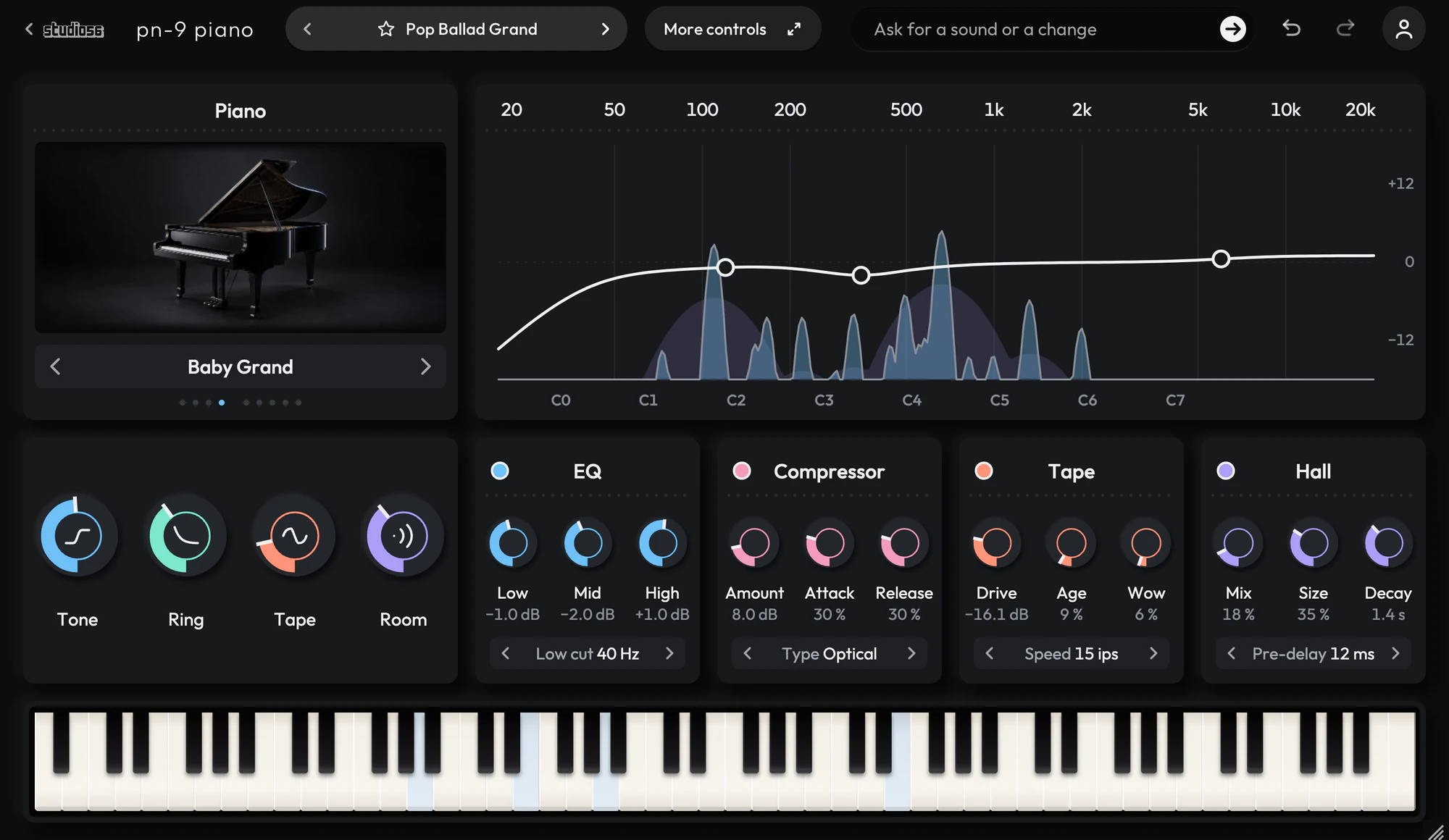
Nine modeled pianos, four grands and five uprights. PN-9 Piano plays nine modeled pianos, with seven velocity layers on every key. A note plays as that key’s own partials, each fading at its own rate, over a hammer noise made fresh for the note, so no recording is stored inside and every key changes tone with how hard you play. An EQ, a compressor, a tape machine and a hall follow the piano.
On this page
Open it in your DAW
PN-9 Piano plays inside Studio 56. Add Studio 56 to an instrument track in your DAW and sign in, then choose PN-9 Piano on Home.
If you don’t have Studio 56 yet, the Support page shows how to install it and add it to a track in your DAW.
The four knobs
The four knobs on PN-9 Piano’s screen shape the whole sound, and each preset sets where they start.
- Tone
- Darkens or brightens the piano, from a soft felt hammer to a bright one.
- Ring
- Sets how long notes ring, from short and damped to long and open.
- Tape
- Runs the piano through tape, from a warm push to a worn, wobbling machine.
- Room
- Moves the piano from a dry room into a large hall.
Your DAW records every turn as automation, and Undo takes a turn back.
Using presets
Click the preset’s name at the top to see them all, or use the arrows beside it to go to the next or the one before. Its folders are down the side, with Favorites and My presets under them, and the star beside a preset keeps it in Favorites.
Save as new keeps the sound you have under a name of your own in My presets, and Save updates one of yours. Point at one of yours to rename or delete it.
Write 4 more like this writes four new presets close to the one you’re on and places them around it on the map beside the list. Drag the dot between them to blend, and Keep this sound saves the blend as a preset of your own. It works with Pro and on a plugin you bought.
100 presets
PN-9 Piano comes with 100 presets in 9 folders, each named for how it sounds.
- Pop Ballad GrandSong Pianos
- Up Close GrandSong Pianos
- Warm Ballad GrandSong Pianos
- Soul Chords GrandSong Pianos
- Bright Song UprightSong Pianos
- R&B UprightSong Pianos
- Wide Song GrandSong Pianos
- Gospel GrandSong Pianos
- Singer Songwriter UprightSong Pianos
- Rock Ballad GrandSong Pianos
+ 90 more presets
More controls
More controls at the top opens the settings PN-9 Piano’s face has no room for. Press it again to go back.
Nine modeled pianos, four grands and five uprights. A fresh hammer sound on every note, with no recording stored inside. An EQ, a compressor, a tape machine and a hall after the piano, each with its own page. The piano’s own settings that the face has no room for, in More controls.
- Piano
- Plays nine pianos, four grands and five uprights, each fitted to recordings of a real piano and played as decaying partials over a hammer noise made for each note.
- 3-Band EQ
- Turns the lows, mids and highs up or down and cuts rumble, without adding any color of its own.
- Character Compressor
- Evens out a sound in four characters: smooth Tube glue, fast and gritty FET, gentle Optical leveling and clean Bus glue.
- Tape Machine
- Records the sound onto studio tape and plays it back, rounding off hits and thickening drums and bass with warm grit.
- Hall
- Rings out like a hall sized from a small room to a cathedral, with a smooth, slowly moving tail you can freeze.
System requirements
- Mac
- macOS 10.15 Catalina or later, on Apple silicon or Intel
- Windows
- Windows, 64-bit
- Plugin formats
- VST3 and AU on Mac, VST3 on Windows
- DAWs
- Ableton Live, Logic Pro, GarageBand, FL Studio and other DAWs that load VST3 or AU plugins, but not Pro Tools
- Internet
- To sign in, to get what you buy and to make instruments and effects, but not to play them
More help
Installing Studio 56, using it offline and other questions are answered on the Support page. For anything else, write to oliver@studio56.ai.