FD-1 Feedback Delay manual
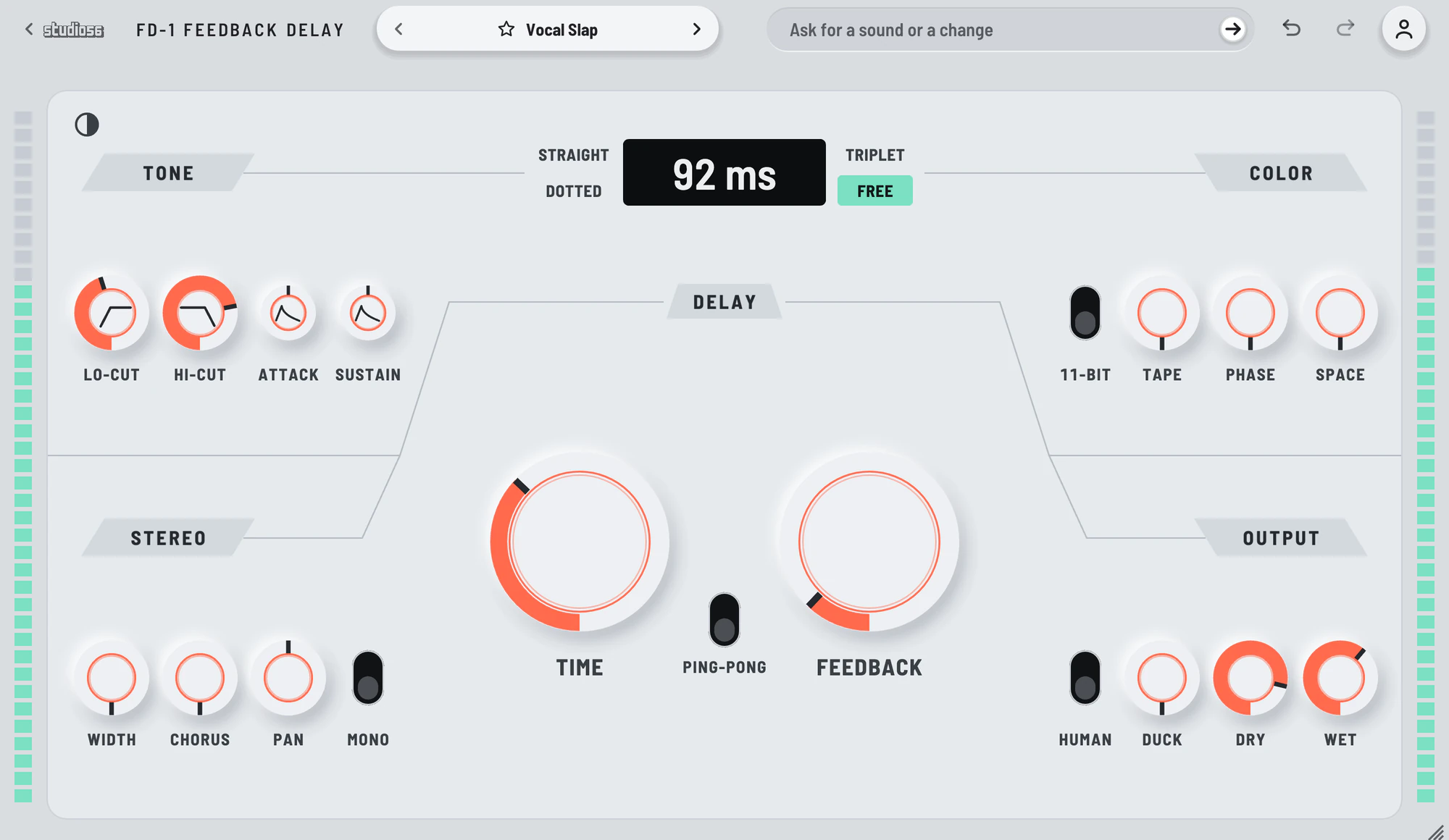
A delay with fourteen stages that shape the repeats and never touch the dry sound. FD-1 Feedback Delay’s delay runs from 0.01 ms to 2.5 seconds, or from a 64th note to a whole note in time with your song, and all fourteen of its stages work on the repeats alone. The cuts, the width and the chorus sit inside the feedback loop, so each repeat comes back darker and wider than the one before, while the dry sound is never delayed, filtered or summed. Switch the delay off and the same stages process the sound itself.
On this page
Open it in your DAW
FD-1 Feedback Delay plays inside Studio 56 FX, which installs with Studio 56. Add Studio 56 FX to a track as an effect and sign in, then choose FD-1 Feedback Delay on Home.
If you don’t have Studio 56 yet, the Support page shows how to install it and add it to a track in your DAW.
The four knobs
The four knobs on FD-1 Feedback Delay’s screen shape the whole sound, and each preset sets where they start.
- Time
- Sets the gap between repeats, from a hundredth of a millisecond to two and a half seconds, or a note value from 1/64 to 1/1 in time with your song.
- Feedback
- Sets how long the repeats last, from a single slap to a loop that holds at the top of its turn.
- Tape
- Warms the repeats, then saturates them, then distorts them with some hiss near the top, with their level held.
- Duck
- Pulls the repeats back while the dry sound plays and lets them swell up in the gaps.
Your DAW records every turn as automation, and Undo takes a turn back.
Using presets
Click the preset’s name at the top to see them all, or use the arrows beside it to go to the next or the one before. Its folders are down the side, with Favorites and My presets under them, and the star beside a preset keeps it in Favorites.
Save as new keeps the sound you have under a name of your own in My presets, and Save updates one of yours. Point at one of yours to rename or delete it.
Write 4 more like this writes four new presets close to the one you’re on and places them around it on the map beside the list. Drag the dot between them to blend, and Keep this sound saves the blend as a preset of your own. It works with Pro and on a plugin you bought.
117 presets
FD-1 Feedback Delay comes with 117 presets in 12 folders, each named for how it sounds.
- Dotted Guitar WideGuitar0:11
- Organ Echo RoomChords0:11
- Bell TrailMelodies0:14
- Pulse Phase EchoMelodies0:12
- Bass Upper EchoBass0:11
- Wide Chorus DoubleWidth0:10
- Dotted Ping-PongRhythm0:12
- Hot Tape EchoTape and Grit0:11
- Chorus ColorColor Without Delay0:11
- Vocal SlapVocals
+ 107 more presets
Every control is on its face
FD-1 Feedback Delay has no second page to open.
Time in milliseconds or in straight, dotted or triplet notes in time with your song, with ping-pong. Every stage on the repeats alone, with separate Dry and Wet levels. A switch that turns the delay off and leaves its stages coloring the sound itself.
- Feedback Delay
- Gives the echoes tape grit, a slow phaser, reverb and stereo drift while the dry sound stays clean.
System requirements
- Mac
- macOS 10.15 Catalina or later, on Apple silicon or Intel
- Windows
- Windows, 64-bit
- Plugin formats
- VST3 and AU on Mac, VST3 on Windows
- DAWs
- Ableton Live, Logic Pro, GarageBand, FL Studio and other DAWs that load VST3 or AU plugins, but not Pro Tools
- Internet
- To sign in, to get what you buy and to make instruments and effects, but not to play them
More help
Installing Studio 56, using it offline and other questions are answered on the Support page. For anything else, write to oliver@studio56.ai.