BS-1 Bowed String manual
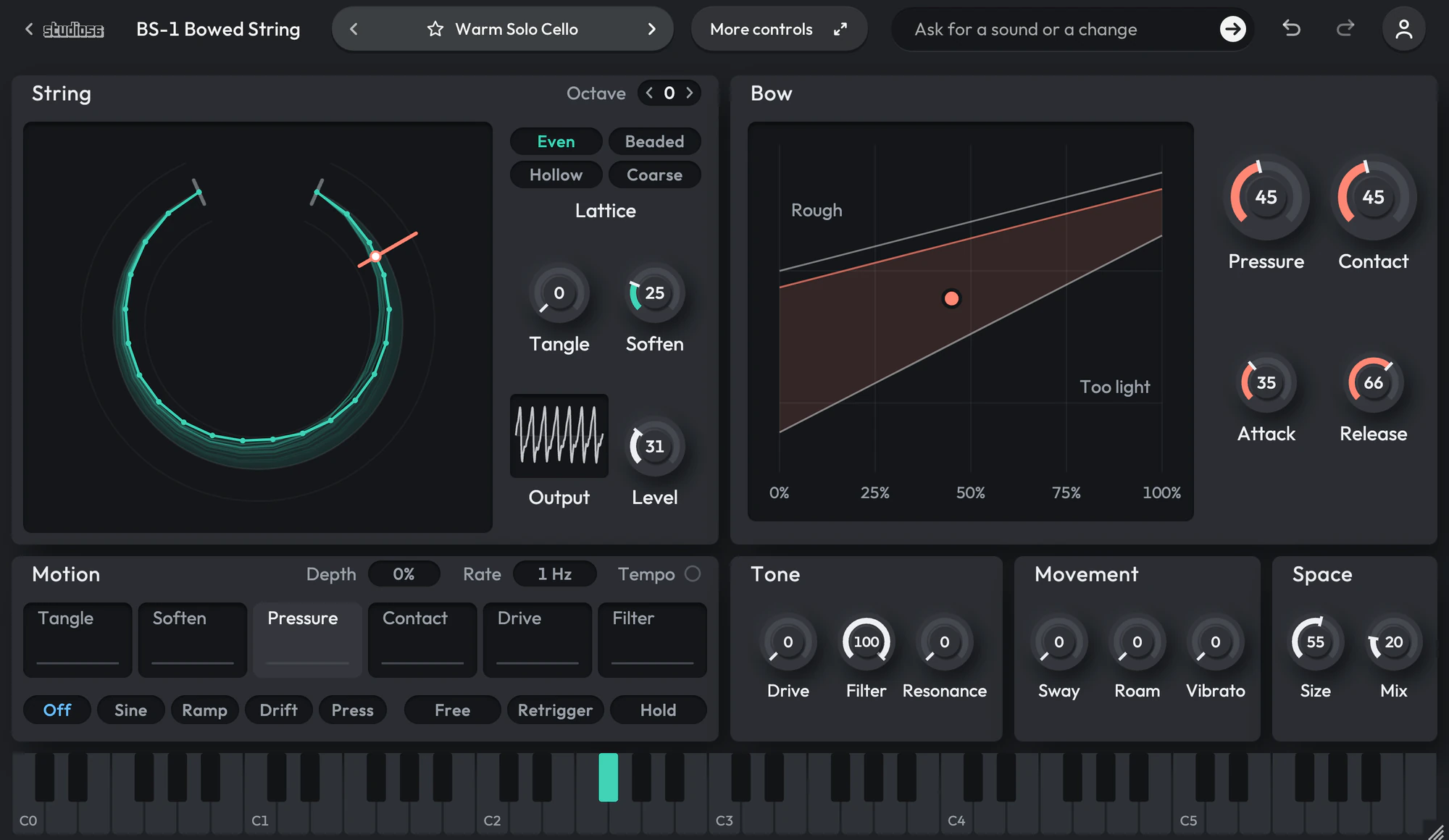
A modeled bowed string of masses joined by up to 320 springs. BS-1 Bowed String plays every note on a string of tiny masses joined by springs, drawn by a bow you can press harder and move along it. Tangle loosens the springs so the tone wanders and widens, Soften damps them from a glassy ring to a felted one, and four ways of building the string take it from an even string to beads that ring like a bell, a hollow pipe or a coarse, gritty one. The ring on the left draws the string itself, moving as you play, and the map beside it shows where the bow sings.
On this page
Open it in your DAW
BS-1 Bowed String plays inside Studio 56. Add Studio 56 to an instrument track in your DAW and sign in, then choose BS-1 Bowed String on Home.
If you don’t have Studio 56 yet, the Support page shows how to install it and add it to a track in your DAW.
The four knobs
The four knobs on BS-1 Bowed String’s screen shape the whole sound, and each preset sets where they start.
- Tangle
- Loosens the springs, so the note spreads wide and wanders off its pitch as it fades.
- Soften
- Damps the springs, from a bright, glassy ring to a soft, felted tone.
- Pressure
- Leans on the bow, from a light, airy stroke to a heavy, scratchy one.
- Contact
- Moves the bow along the string, which changes which of its overtones sound.
Your DAW records every turn as automation, and Undo takes a turn back.
Using presets
Click the preset’s name at the top to see them all, or use the arrows beside it to go to the next or the one before. Its folders are down the side, with Favorites and My presets under them, and the star beside a preset keeps it in Favorites.
Save as new keeps the sound you have under a name of your own in My presets, and Save updates one of yours. Point at one of yours to rename or delete it.
Write 4 more like this writes four new presets close to the one you’re on and places them around it on the map beside the list. Drag the dot between them to blend, and Keep this sound saves the blend as a preset of your own. It works with Pro and on a plugin you bought.
112 presets
BS-1 Bowed String comes with 112 presets in 9 folders, each named for how it sounds.
- Warm Solo CelloBowed Strings
- Dark Solo CelloBowed Strings
- Ponticello CelloBowed Strings
- Soft Bowed Bass ViolBowed Strings
- Solo ViolaBowed Strings
- Airy ViolaBowed Strings
- Solo ViolinBowed Strings
- Sweet ViolinBowed Strings
- Gritty ViolinBowed Strings
- Hollow FiddleBowed Strings
+ 102 more presets
More controls
More controls at the top opens the settings BS-1 Bowed String’s face has no room for. Press it again to go back.
Four ways to build the string: even, beaded like a bell, hollow like a pipe, or coarse and gritty. A motion on each of its six controls: a sine, a ramp, a random drift or how hard you hold the key, free or in time with your song. Sway, Roam and Vibrato to keep a held note moving. A window that draws the string itself as it moves.
- Bowed Springs
- Bows or plucks a simulated string for cello-like sustains, glassy harmonics and bell-like plucks, turning rough and wandering as you press harder.
- Hall
- Rings out like a hall sized from a small room to a cathedral, with a smooth, slowly moving tail you can freeze.
System requirements
- Mac
- macOS 10.15 Catalina or later, on Apple silicon or Intel
- Windows
- Windows, 64-bit
- Plugin formats
- VST3 and AU on Mac, VST3 on Windows
- DAWs
- Ableton Live, Logic Pro, GarageBand, FL Studio and other DAWs that load VST3 or AU plugins, but not Pro Tools
- Internet
- To sign in, to get what you buy and to make instruments and effects, but not to play them
More help
Installing Studio 56, using it offline and other questions are answered on the Support page. For anything else, write to oliver@studio56.ai.